Sub-150ms transcription with cloud-level accuracy: Why we built a hybrid engine
By Roman Shemet
The Voice Interface Dilemma
Voice is no longer a novelty; it is quickly becoming the default interface. From meeting transcriptions and dictation to voice notes and ambient computing, users expect to speak to their devices.
But building a seamless voice experience is hard. If you've ever built a voice product, you are intimately familiar with the iron triangle of AI: Cheap, Accurate, Fast.
Historically, you could only pick two: - Fast and Accurate? It won't be cheap. You'll need heavy cloud compute. - Fast and Cheap? It won't be accurate. You're running tiny, compromised models. - Cheap and Accurate? It won't be fast. You're waiting in API queues.
The logic is simple. High-accuracy transcription requires large models. Large models require massive cloud resources. This introduces network latency and high infrastructure costs.
Or, you can run small models on-device. The latency is practically zero, and compute is free. But smaller models struggle with noisy environments, accents, and complex vocabulary.
You either pay the "cloud tax" in latency and cost, or you pay the "edge tax" in accuracy.
Enter Hybrid AI: The Best of Both Worlds
We didn't want to choose, so we spent the last few months building a third option at Cactus. We call it Hybrid AI.
What if we had small, fast on-device models that were self-aware enough to know when they are struggling?
Instead of routing 100% of user audio to an expensive cloud API, the Cactus engine processes speech locally by default. Our on-device inference provides real-time transcription with sub-150ms latency.
However, when the engine detects messy audio (think background noise, static, or multiple speakers), it automatically hands that specific segment off to a larger model in the cloud to clean it up.
It's like having a brilliant intern who processes 80% of the work instantly, but knows exactly when to call the senior engineer to review the tricky edge cases.
See it in Action
Here is a look at the hybrid engine running locally, seamlessly managing the local-to-cloud transcription flow:
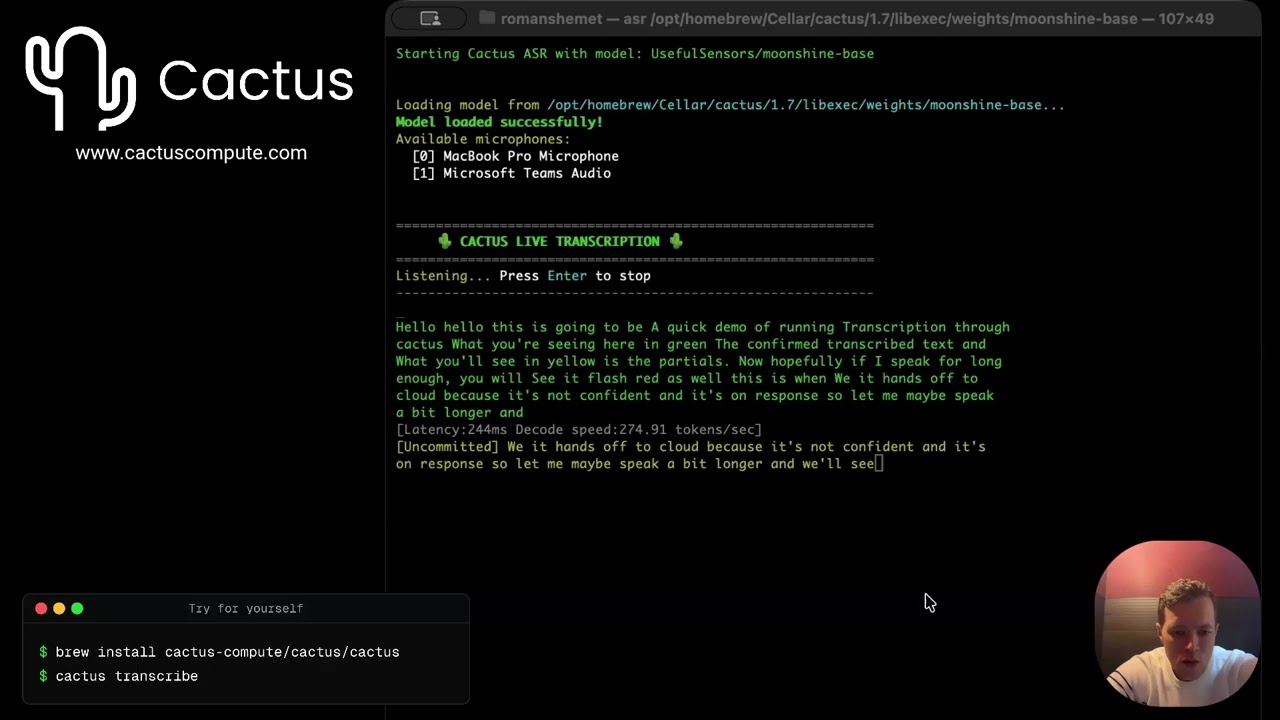
As a Mac user, you can pull down the CLI and test the latency and accuracy locally right now:
Built for the Edge, from the Ground Up
Achieving this required relying on our industry-leading on-device engine. We built Cactus from the ground up exactly for this.
Because the engine sits directly on the metal, it is optimized for edge constraints. It targets ARM-based CPUs and NPUs natively, resulting in super low RAM usage (e.g. Moonshine transcription for example, runs with sub-10MB RAM utilization). This is a critical factor for mobile and wearable devices where memory is strictly rationed by the OS.
By keeping the footprint minimal, the engine operates silently in the background without draining battery or causing OS-level memory warnings, making it viable for continuous, ambient listening.
A Single API for Every Platform
While the underlying engine is low-level C++, we know that product teams need to move fast in their native environments. We designed the integration to be a drop-in experience regardless of your stack.
The interface remains the same whether you are a low-level C++ engineer, or a mobile developer. You can integrate the Cactus Hybrid AI engine directly into your stack: - Mobile: React Native, Flutter, Kotlin, Swift - Systems: C++, Rust - Scripting: Python
At the top level, the implementation is beautifully simple: initialize the model, pass the audio stream, and receive real-time text.
A few levels deeper, developers have granular control. You can configure the engine's behavior to define a specific Word Error Rate (WER) threshold, target a strict cloud-handoff ratio, or establish hard cost limits per user.
Check out the open-source engine and documentation on GitHub.
See Also
- Cactus Engine API Reference — Full transcription API docs (
cactus_transcribe,cactus_stream_transcribe_*) - Python SDK — Python bindings with transcription support
- Swift SDK — Swift API with async streaming transcription
- Kotlin/Android SDK — Kotlin API with transcription support
- Flutter SDK — Flutter bindings with streaming transcription
- LFM2 24B Review — Running large MoE models locally with Cactus